SAVE UP TO 25% OFF TODAY - SAVINGS APPLIED AUTOMATICALLY IN CART

  • Log in
  • Cart (0)
  • Checkout
Pretty Presets and Pretty Photoshop Actions
  • Lightroom Presets
  • Best Sellers
  • Mobile Presets
  • Photoshop 
    • Photoshop Actions
    • Photoshop Overlays
    • Limited Edition Holiday Collections
  • Learn 
    • Free Lightroom Training
    • Free Photoshop Training
    • Your Pretty Edits
  • Support 
    • About Us
    • Contact Us
    • Order Lookup
    • Lightroom FAQ
    • Photoshop FAQ
  • Install 
    • How to Install Lightroom Presets
    • How to Install Lightroom Brushes
    • How to Install Presets in the Free Lightroom Mobile App
    • How to Sync Lightroom Presets from CC to Mobile
    • How to Install Photoshop Actions
    • How to Install Photoshop Overlays
  • Blog
  • Lightroom Presets
  • Best Sellers
  • Mobile Presets
  • Photoshop 
    • Photoshop Actions
    • Photoshop Overlays
    • Limited Edition Holiday Collections
  • Learn 
    • Free Lightroom Training
    • Free Photoshop Training
    • Your Pretty Edits
  • Support 
    • About Us
    • Contact Us
    • Order Lookup
    • Lightroom FAQ
    • Photoshop FAQ
  • Install 
    • How to Install Lightroom Presets
    • How to Install Lightroom Brushes
    • How to Install Presets in the Free Lightroom Mobile App
    • How to Sync Lightroom Presets from CC to Mobile
    • How to Install Photoshop Actions
    • How to Install Photoshop Overlays
  • Blog

Lightroom vs Photoshop (Which Should You Use?)

By Elizabeth Halford on July 10, 2026 | No Comments

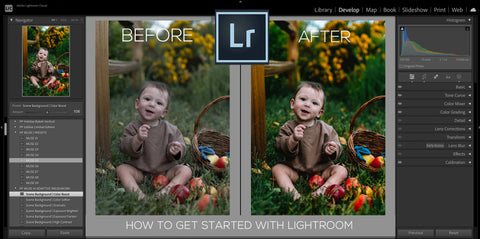
Lightroom vs Photoshop

Lightroom vs. Photoshop: Which Should You Use?

One of the most common questions we get from photographers at every level is: "Should I use Lightroom or Photoshop?" The short answer is that they do different things — and understanding the difference will save you a lot of time, money, and frustration.

In this guide, we'll break down exactly what each program does best, who each one is for, and how to decide which is right for your photography workflow.

Lightroom & Photoshop Facebook Group

New to Lightroom? Start here

NATURA Evolution AI Preset Collection

★★★★★

The easiest way to get beautiful results in Lightroom — AI-powered one-click presets with clean, natural tones.

Trusted by 163,000+ photographers worldwide

Shop NATURA Evolution →

What is Adobe Lightroom?

Adobe Lightroom is a photo editing and organization tool designed specifically for photographers. It's built around a non-destructive workflow — meaning your original files are never altered, and every edit can be undone at any time.

Lightroom is best for:

  • Editing large batches of photos quickly and consistently
  • Organizing, sorting, and managing your photo library
  • Applying presets for one-click looks across entire sessions
  • Color grading, exposure correction, and tone adjustments
  • Editing on mobile with Lightroom Mobile
  • AI-powered tools like Denoise, AI Masking (Subject, Sky, Background), and Generative Remove

Lightroom comes in two versions: Lightroom Classic (desktop-focused, full library management) and Lightroom (cloud-based, syncs across devices). Both are included with an Adobe Creative Cloud Photography plan.

What is Adobe Photoshop?

Adobe Photoshop is a pixel-level image editor with virtually unlimited creative possibilities. It's the industry standard for graphic design, photo compositing, retouching, and any edit that requires working with layers, selections, or custom brushwork.

Photoshop is best for:

  • Complex retouching (removing objects, swapping backgrounds, skin retouching)
  • Photo compositing — combining multiple images into one
  • Adding overlays like sun flares or sky replacements
  • Graphic design, text overlays, and marketing materials
  • Precise selections and masking at the pixel level
  • Generative AI features like Generative Fill and Generative Expand

Lightroom vs. Photoshop: Key Differences

1. Workflow Speed

Lightroom wins here — by a lot. You can import hundreds of photos, apply a preset to all of them in one click, make batch adjustments, and export the entire gallery in minutes. Photoshop requires opening each file individually, which makes it impractical for high-volume editing.

If you shoot weddings, portraits, families, or events, Lightroom's batch workflow will save you hours every single week.

2. Non-Destructive Editing

Lightroom is entirely non-destructive — your original RAW files are never touched. Every edit is stored as a set of instructions that can be changed or reversed at any time. Photoshop can be non-destructive if you use Smart Objects and adjustment layers, but it requires more intentional setup.

3. AI Tools

Both programs now have powerful AI features, but they work differently. Lightroom's AI Masking (Subject, Sky, Background, People) makes targeted adjustments incredibly fast — and it's the foundation of our AI Portrait PRO and NATURA Evolution collections. Photoshop's Generative Fill is unmatched for removing objects or extending backgrounds.

4. Organization

Lightroom has a full-featured library system for organizing, rating, flagging, keywording, and searching your photos. Photoshop has no library management — it's purely an editor. If you have thousands of photos to manage, Lightroom is essential.

5. Learning Curve

Lightroom is significantly easier to learn. Most photographers feel comfortable with the basics within a few hours. Photoshop has a much steeper learning curve and can take months to master. For photographers who just want to edit their photos beautifully and efficiently, Lightroom is the clear starting point.

6. Presets

Lightroom presets are one of the most powerful features in the program — they let you apply a complete look to any photo in one click. Modern AI presets like our AI Portrait PRO collection go even further, using Lightroom's AI masking to apply targeted adjustments to just the subject, background, skin, or eyes automatically. Photoshop has Actions (similar concept) but they're more complex to use and don't integrate with a batch workflow the same way.

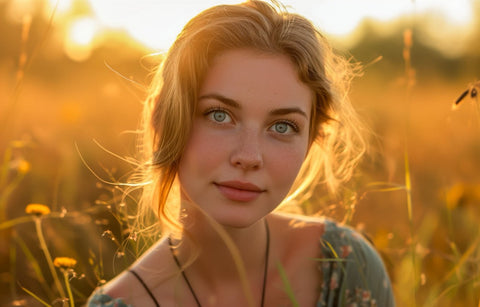
Girl edited by AI Portrait pro

So Which Should You Use?

Choose Lightroom if you:

  • Are a photographer who shoots portraits, families, weddings, landscapes, or lifestyle
  • Want to edit photos quickly and consistently
  • Shoot in RAW format
  • Want to use presets for one-click editing
  • Edit on both desktop and mobile
  • Are new to photo editing

Choose Photoshop if you:

  • Need to composite images or remove complex objects
  • Do graphic design or create marketing materials
  • Want to add overlays, textures, or special effects
  • Need pixel-level retouching control

Use both if you:

  • Are a professional photographer who needs the full toolkit
  • Want to do 95% of your editing in Lightroom and send select images to Photoshop for advanced retouching

The good news: Adobe's Creative Cloud Photography plan includes both Lightroom Classic and Photoshop, so you don't have to choose — you can use each for what it does best.

Getting Started with Lightroom

If you're new to Lightroom or switching from Photoshop, the fastest way to get beautiful results is with a great preset collection. Our NATURA Evolution AI Collection is designed for photographers who want clean, natural, professional-looking edits with minimal effort — and it works in Lightroom Classic, Lightroom CC, and Lightroom Mobile.

Do you have any questions or comments about Lightroom vs. Photoshop? Leave us a comment below — we would love to hear from you! And PLEASE SHARE this post using the social sharing buttons (we really appreciate it)!

Get beautiful Lightroom results in one click

NATURA Evolution AI Preset Collection

★★★★★

Clean, natural tones with AI-powered masking — works in Lightroom Classic, CC & Mobile.

Trusted by 163,000+ photographers worldwide

Get NATURA Evolution →
Related Articles

How to Export Photos From Lightroom
Learn how to export photos from Lightroom with our step-by-step guide. Discover essential tips on file naming, image siz
Read More
How to Create a Golden Hour Effect in Lightroom
Learn how to create an enchanting GOLDEN HOUR EFFECT in Lightroom.  Follow our step-by-step instructions to create stunn
Read More
Getting Started with Lightroom: A Beginner's Guide
Get started with Lightroom and Lightroom Classic with our easy-to-follow guide for beginners!  Learn to import photos, a
Read More
Pretty Presets for Lightroom author Elizabeth Halford

Elizabeth Halford

Portrait Photographer

Elizabeth Halford is a professional photographer and blogger. She gives real photography advice in real.plain.english. 

July 10, 2026

Comments

INFO & SUPPORT
  • Lightroom FAQ
  • Photoshop FAQ
  • Contact Us
  • Order Lookup
  • Log Into Account
Sign up for great freebies and tutorials

Get notified about promotions, giveaways and webinars before they happen!

Join the pretty Community

Come join the #1 Lightroom & Photoshop Facebook Group to help you learn how to edit your photos more confidently today!


  • About Us
  • Testimonials
  • Policies
  • Terms of Service
  • Write for Pretty
  • Lightroom Scholarship
  • Photoshop Scholarship

© 2026 Pretty Presets for Lightroom | support@prettypresets.com (406) 298-3006

  •  
  •  
  •