JUST RELEASED: JEWEL EVOLUTION ONLY $39 (45% OFF)

  • Log in
  • Cart (0)
  • Checkout
Pretty Presets and Pretty Photoshop Actions
  • Lightroom Presets
  • Best Sellers
  • Mobile Presets
  • Photoshop 
    • Photoshop Actions
    • Photoshop Overlays
    • Limited Edition Holiday Collections
  • Learn 
    • Free Lightroom Training
    • Free Photoshop Training
    • Your Pretty Edits
  • Support 
    • About Us
    • Contact Us
    • Order Lookup
    • Lightroom FAQ
    • Photoshop FAQ
  • Install 
    • How to Install Lightroom Presets
    • How to Install Lightroom Brushes
    • How to Install Presets in the Free Lightroom Mobile App
    • How to Sync Lightroom Presets from CC to Mobile
    • How to Install Photoshop Actions
    • How to Install Photoshop Overlays
  • Blog
  • Lightroom Presets
  • Best Sellers
  • Mobile Presets
  • Photoshop 
    • Photoshop Actions
    • Photoshop Overlays
    • Limited Edition Holiday Collections
  • Learn 
    • Free Lightroom Training
    • Free Photoshop Training
    • Your Pretty Edits
  • Support 
    • About Us
    • Contact Us
    • Order Lookup
    • Lightroom FAQ
    • Photoshop FAQ
  • Install 
    • How to Install Lightroom Presets
    • How to Install Lightroom Brushes
    • How to Install Presets in the Free Lightroom Mobile App
    • How to Sync Lightroom Presets from CC to Mobile
    • How to Install Photoshop Actions
    • How to Install Photoshop Overlays
  • Blog

Best Lightroom Presets for Portraits: Beautiful, Natural, and Effortless

By Laura Thomas on March 28, 2026 | No Comments

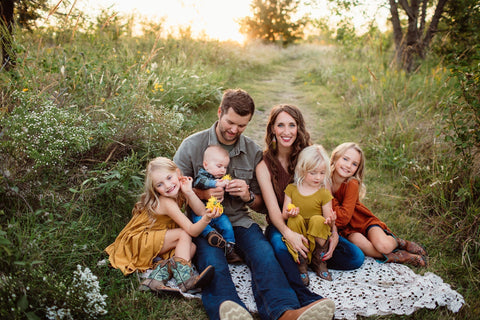
Best Lightroom Presets for Portraits

There’s something so special about photographing people. Capturing their stories, emotions, and connections through your lens. But as every photographer knows, editing portraits can be tricky. Finding that perfect balance between flattering skin tones, soft light, and true color takes time and practice.

That’s where the right Lightroom presets can make all the difference. 

Whether you’re a professional photographer or a passionate hobbyist, using high-quality presets helps you edit consistently, speed up your workflow, and give every image a polished, professional finish without losing your subject's natural beauty.

Below, we’re sharing our favorite Pretty Presets collections for portrait photographers, crafted to make every face glow and every photo feel beautifully authentic.

NATURA Evolution Presets – Clean, Timeless, and Effortlessly Refined

If your portrait style leans toward natural, light-filled edits that never feel overdone, you’ll fall in love with NATURA Evolution.

Inspired by soft natural light and organic tones, NATURA enhances your images while preserving the true-to-life colors that make them feel authentic and elegant. It’s perfect for family sessions, lifestyle portraits, weddings, and anyone who wants clean, cohesive edits across their entire gallery.

Why photographers love NATURA:

  • Creates beautiful, natural skin tones without heavy contrast
  • Works seamlessly in a variety of lighting — indoor and outdoor
  • Offers soft contrast, rich depth, and a modern minimalist vibe
  • Powered by Lightroom Adaptive AI Technology to fine-tune edits automatically

It’s editing that feels easy, natural, and true to your vision — every single time. 

AI Portrait Pro Presets – Intelligent Edits Made Simple

For photographers who love precision and efficiency, AI Portrait Pro is your new editing companion. This next-generation preset and tool collection uses Lightroom’s built-in AI masking to automatically detect faces, skin, hair, eyes, and backgrounds — allowing you to edit portraits faster and with incredible accuracy.

With just a few clicks, you can brighten eyes, soften skin, enhance natural tones, and make every portrait glow, all while maintaining that delicate, realistic touch.

Why photographers love AI Portrait Pro:

  • Powered by Lightroom Adaptive AI Masks for effortless fine-tuning
  • Delivers clean, balanced, and flattering skin tones
  • Perfect for headshots, senior portraits, and editorial work
  • Includes one-click retouching tools that simplify your entire workflow

This collection is truly a game-changer for busy photographers who want results that look professional but still feel natural and human.

MUSE Evolution AI Collection – Classic & True-to-Life

The MUSE Evolution AI Collection is a longtime favorite among Pretty Presets photographers, and for good reason.

Designed for those who love timeless, true-to-color images, this collection gives portraits a clean edit and a bold touch, with contrast and depth. It’s especially popular for studio portraits, lifestyle sessions, and client galleries where consistency matters most.

Why photographers love MUSE Evolution AI:

  • Delivers balanced, professional tones to your images
  • Perfect for a wide variety of skin tones and lighting conditions
  • Maintains a realistic look with natural color with a touch of boldness
  • Easy to use and tweak for your signature style

🌸 Choosing the Perfect Preset for Your Portraits

Every photographer’s style is unique, and so is every lighting situation. Here’s a quick guide to help you choose the best Pretty Presets collection for your portrait work:

Your Style Best Collection Why You’ll Love It
Soft, natural, lifestyle NATURA Evolution Gentle warmth + consistent tones
Bright, flattering, studio AI Portrait Pro Precision editing with intelligent AI tools
Bold and colorful edit MUSE Evolution Bold and vibrant colors + amazing toolkit

💬 Final Thoughts

At Pretty Presets, our goal has always been to help photographers spend less time editing and more time creating while giving every photo the care it deserves.

Whether you’re capturing families, seniors, or professional headshots, these portrait Lightroom presets are designed to enhance your work with natural beauty, simplicity, and heart.

Because the best portraits don’t just look beautiful, they feel like the person you’re photographing. 


Explore our Portrait Preset Collections:

  • Shop NATURA Evolution
  • Shop AI Portrait Pro
  • Shop MUSE Evolution

Related Articles

Self Portrait Photography Ideas & Tips (To Help You Get Started)
Secret to Taking Great Photos from Any Location
Food Photography – 6 Tips for Beginners
March 28, 2026

Comments

INFO & SUPPORT
  • Lightroom FAQ
  • Photoshop FAQ
  • Contact Us
  • Order Lookup
  • Log Into Account
Sign up for great freebies and tutorials

Get notified about promotions, giveaways and webinars before they happen!

Join the pretty Community

Come join the #1 Lightroom & Photoshop Facebook Group to help you learn how to edit your photos more confidently today!


  • About Us
  • Testimonials
  • Policies
  • Terms of Service
  • Write for Pretty
  • Lightroom Scholarship
  • Photoshop Scholarship

© 2026 Pretty Presets for Lightroom | support@prettypresets.com (406) 298-3006

  •  
  •  
  •